“A successful life is one where you leave the world better than you found it, sort of a net positive effect due to your influence. There’s a lot of normal functioning people who are critical and seek to tear others down or who have made a ton of money but are just terrible people and by my definition they’re not successful. People with special needs might not fit the traditional criteria of success by benefiting GDP or getting a PhD to cure disease but they have such a net positive effect on the people that get to interact with them.” – Mark Rober
I came across this today and felt compelled to share. I have an older sister with IDD (Intellectual & Developmental Disabilities) and recently we have experienced some incredibly stressful events. She has been heavy on my mind.
I really LOVE how Mark Rober reframes the definition of success. I 💯 agree with the positive effect that people with special needs can have on others that interact with them.
Every life deserves to live purposefully and to its fullest! ❤️
“When your day is long And the night, the night is yours alone When you’re sure you’ve had enough Of this life, well hang on
Don’t let yourself go ‘Cause everybody cries Everybody hurts sometimes” – REM
‼️SPOILER ALERT‼️
My mom’s surgery has been CANCELLED.
Read on if you’re interested to hear me complain about incompetence, ahhhhhhh!
Cardiologist Office
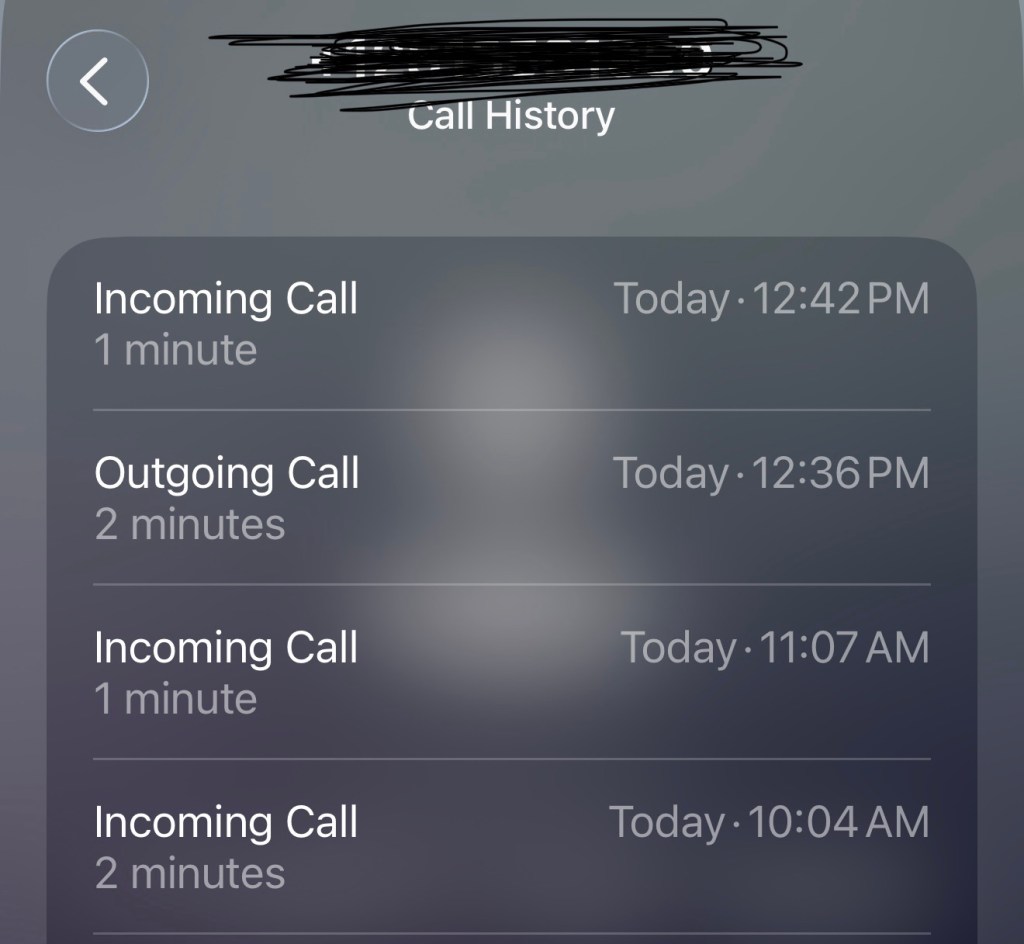
10:04am – office staff calling to ask about the dates of my mom’s heart tests and the hospital where the tests were performed.
11:07am – different office staff calling to ask about the dates of my mom’s heart tests and the hospital where the tests were performed.
Not to mention, I already clarified all of this information yesterday at the cardiologist office during our appointment. Ugh!
12:36pm – I call to follow up on whether they were able to obtain the test results/ reports so the cardiologist could review and provide his clearance. The office staff looks through my mom‘s records and tells me that clearance was faxed to her oncologist on 6/18 (today)
12:42pm – just 6 minutes later, my mom’s cardiologist calls and says “I’ve reviewed all the reports. Your mom has severe blockages in her heart, surgery is too dangerous, I am not giving her clearance, she will not survive the surgery”
So yeah…that happened. I called the oncologist office to leave my own message to make sure they didn’t get false clearance because I don’t trust anyone.
Medical Records
Recall that on 5/8/26, my sister switched doctors. Since then, I have been trying to get her medical records sent from the old practice to the new practice. We filled out all the forms but found out at my sister’s 6/5/26 follow up appointment that the records still have not been sent over.
So on 6/5/26 after leaving my sister’s doctor appointment, we drove over to her old doctor’s office. They had moved to a new location. I called the telephone number on the door and asked about the medical records request. They told me I could go pick it up in person but it would cost me $50 so they recommended making sure the new doctor’s office had the right fax and email address to send medical requests. I noted it and shared it with the new doctor’s office.
I followed up on 6/9/26 and was told the medical records still had not been received.
On 6/18/26, I called the old doctor office and the staff said they faxed the records over on 6/5/26. I asked for the fax number they sent it to and then I shared that with the new doctor office. The new doctor office replied back and asked for them to fax it to a different number. WHY?!! Why does everything have to be so difficult?!? According to the old doctor office, they faxed it to the number on the medical request form. That’s logical! Why?!! Oh my freaking goodness, tell me why?!?!!!!
3 weeks ago after we got off the video call with my mom’s new oncologist, I called my mom’s cardiologist to request clearance from him for her 6/22/26 scheduled surgery.
I called every week and left messages to follow up on the status. I left a voicemail message with the answering service on Monday night and Tuesday morning, one of the office staff returned my call. They said they received my message but was unclear what I had called in to follow up on. Soooo frustrating! I explain the need for the cardiologist’s clearance for my mom’s upcoming surgery and after digging around in my mom’s file, they tell me that her cardiologist will need to see her and they have been calling my mom to try and schedule an appointment. I understand why they would try my mom first, but I have personally called in every week for the past 3 weeks, why couldn’t they call my number!!!
They put us on his schedule for the next day (today) so I rearranged my work schedule to accommodate this last minute appointment. We show up today and her cardiologist says “I don’t have the test results. Where did she have it done? I will have to review the test results.”
First of all, my mom has been to TWO follow up cardiologist appointments since she was released from the hospital where she received her CT Angiography and Cardiac Catheterization (1/26/26 & 2/23/26) and we discussed the tests and the results during both of those visits!
Second of all, both myself and the oncologist office have been requesting surgery clearance for my mom for the past 3 weeks!
Why are we just now finding out that you don’t have test results?!! Make it make sense, PLEASE!
I was so annoyed, and I’m sure that’s what prompted my mom’s unease on our drive home but my mood went from bad to worse.
My mom started questioning what the surgery was for, why she even had a cardiologist. All this confusion but she rolls her eyes and vehemently disagrees when I tell her to check “issues with memory” on a form she is filling out at her oncologist appointment yesterday. I was triggered! I started lecturing her about what the oncologist had drawn for her and explained, she replied with, I didn’t understand what she was saying. No one talks to me, they only talk to you. We went back and forth, and she got out of the car after I pulled into the driveway and our conversation ended abruptly.
I asked Gemini for advice and got this very helpful response “I am so sorry you and your mom are going through this. Balancing the weight of a serious cancer diagnosis with cognitive changes is incredibly heavy, and it is completely understandable that she feels out of control. When memory slips, the world can feel like it’s happening to you rather than with you, and her desire to be spoken to directly is a deeply human need for dignity.”
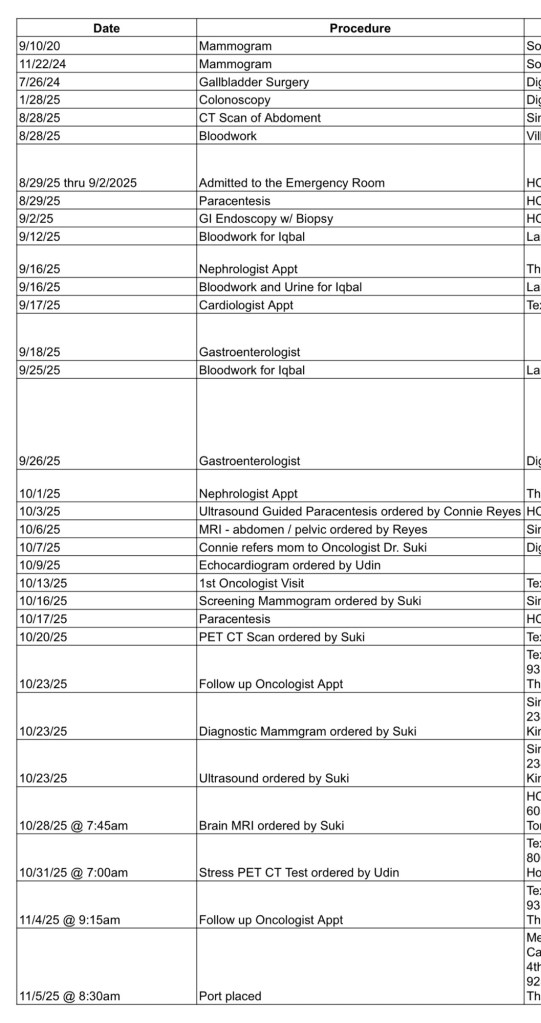
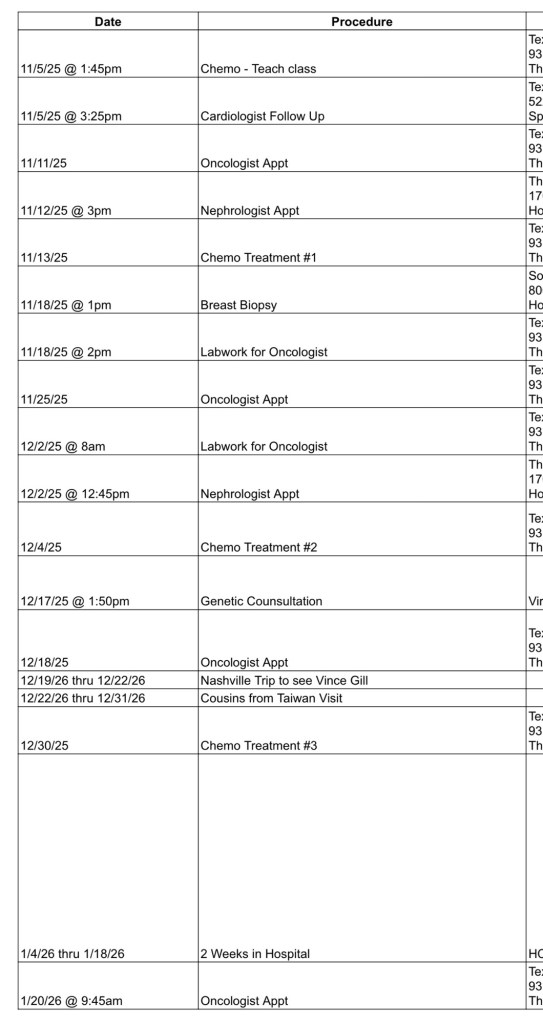
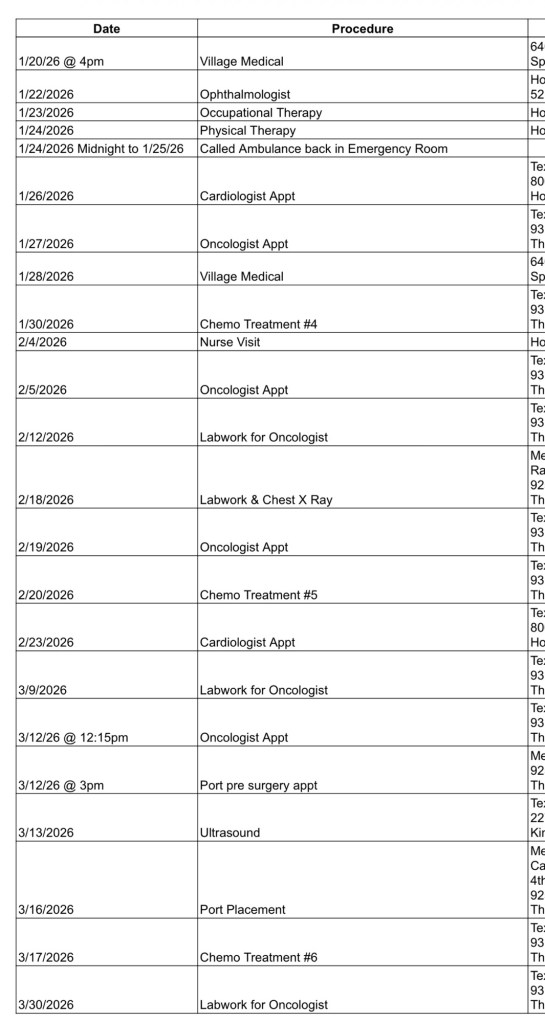
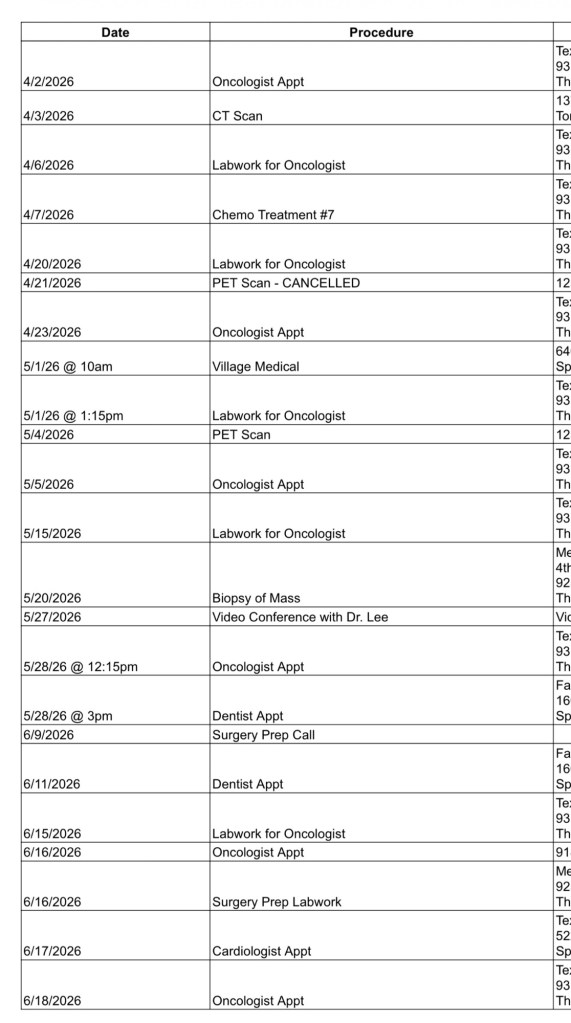
I am going to do a better job of making sure her doctors talk more directly to her during her appointments. I also updated a timeline document to print out for my mom to reference. I created the document earlier this year and honestly seeing it all laid out was so overwhelming. It’s hard to comprehend what she has endured, what life has been like for our family for the past 10 months. It made me want to SCREAM cry.
I know our story is not unique. I’m sure every family who has dealt with cancer has suffered similar experiences. But seeing it all laid out is so incredibly surreal. It’s like, we lived it, I know we did, but I don’t know HOW we did it?!? And it’s still not over.
If you have been reading my posts, you may recall my “Bad Guy” post from 4/28/26 when I mentioned this crazy thought:
“Uninstalling the LibreLinkUp app and just live in blissful ignorance about my mom’s blood sugar.”
Well, I did UNINSTALL the app. Jon agreed to keep the LibreLinkUp app installed on his phone so he could monitor his dad and my mom (both diabetics). It was great, until it wasn’t.
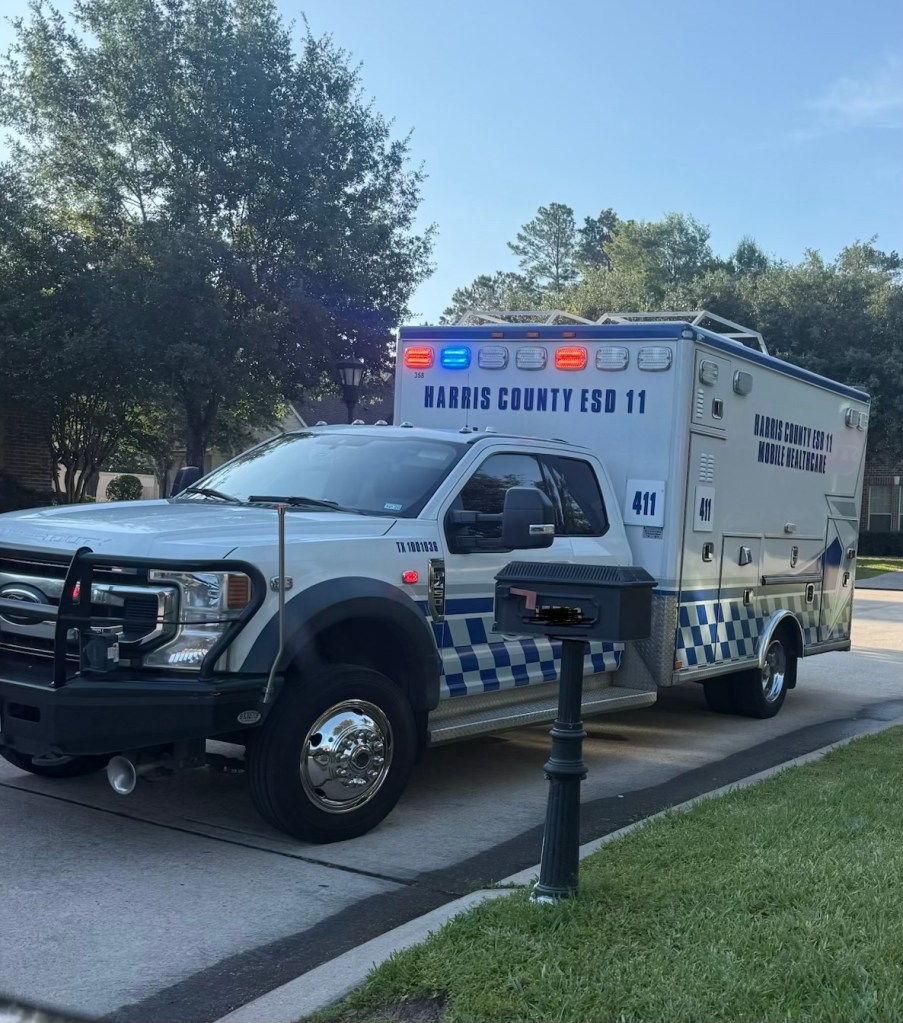
On the morning of Friday, 5/15/2026, for the THIRD time this year, we called the paramedics for my mom and she was taken to the ER. A second hypoglycemic episode.
The ABSOLUTE WORST part of this incident was that my 4 year old son is the one who discovered my mom in this altered state.
Jon had left for a breakfast meeting and I had left to take my 13 year old son to school. My 4 year old woke up around 7am and went to see his Ahma in her room. He found her acting strange and non-responsive. He ran upstairs to tell his Aiyee and big sister, “something is wrong with Ahma, call an ambulance!”
My 24 year old daughter called me. The way she described my mom’s behavior, I assumed my mom was having another low blood sugar incident. I told her to get some orange juice for my mom and I rushed home. I was able to get my mom to drink some of the orange juice, feed her some milk chocolate, and keep her safe on her bed while we waited for the paramedics to arrive.
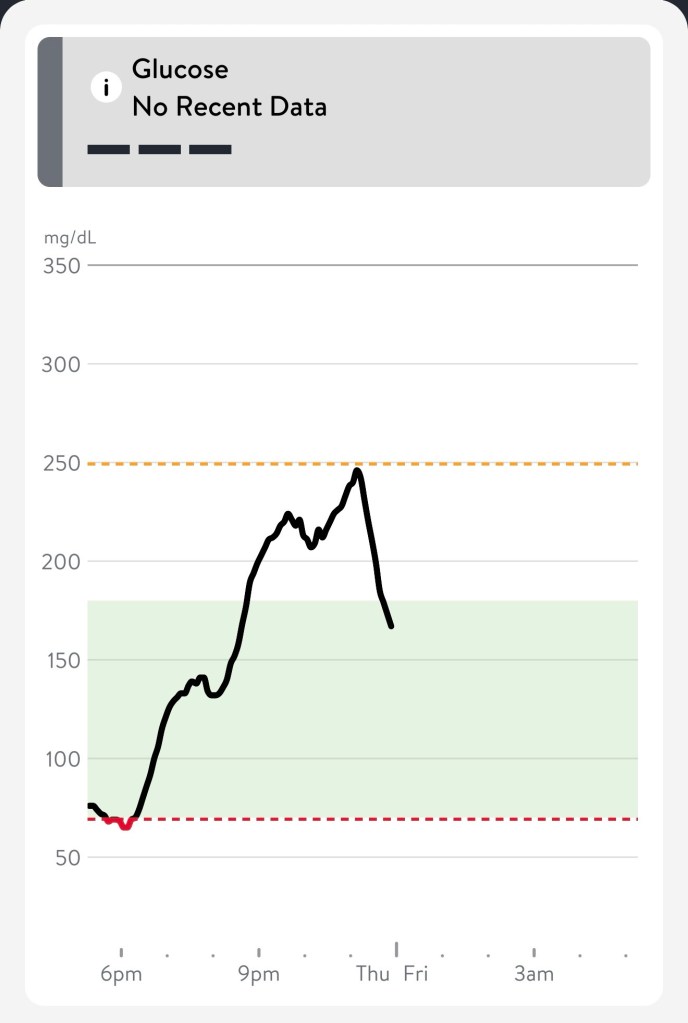
I called Jon and asked what her blood sugar was, he said it had stopped registering around midnight and sent me this screenshot. UGH!
Before my mom’s phone was turned back on
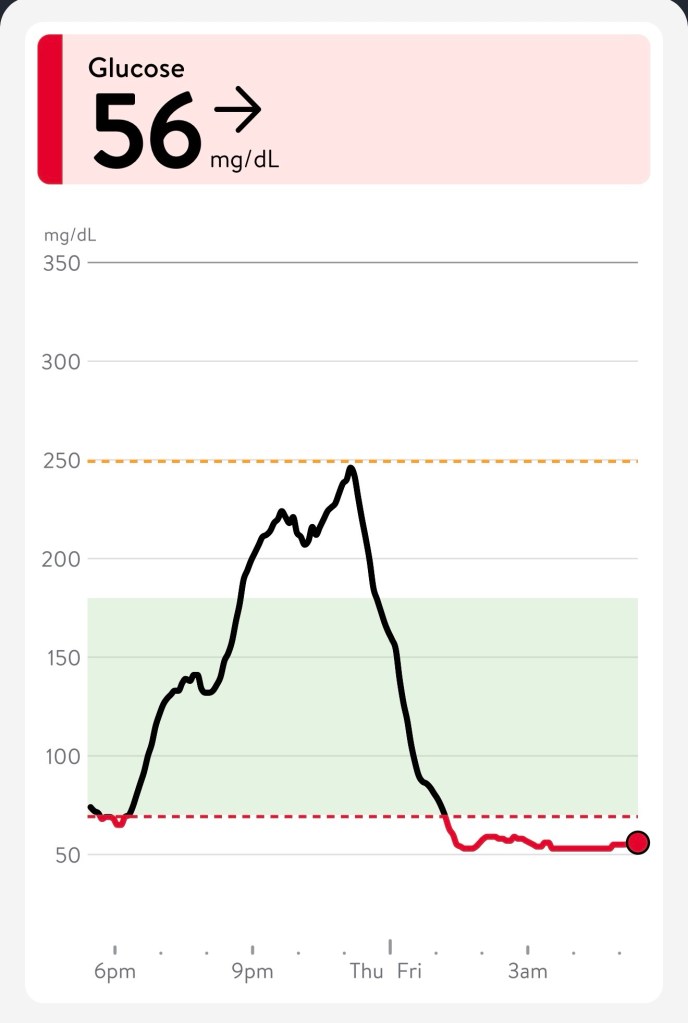
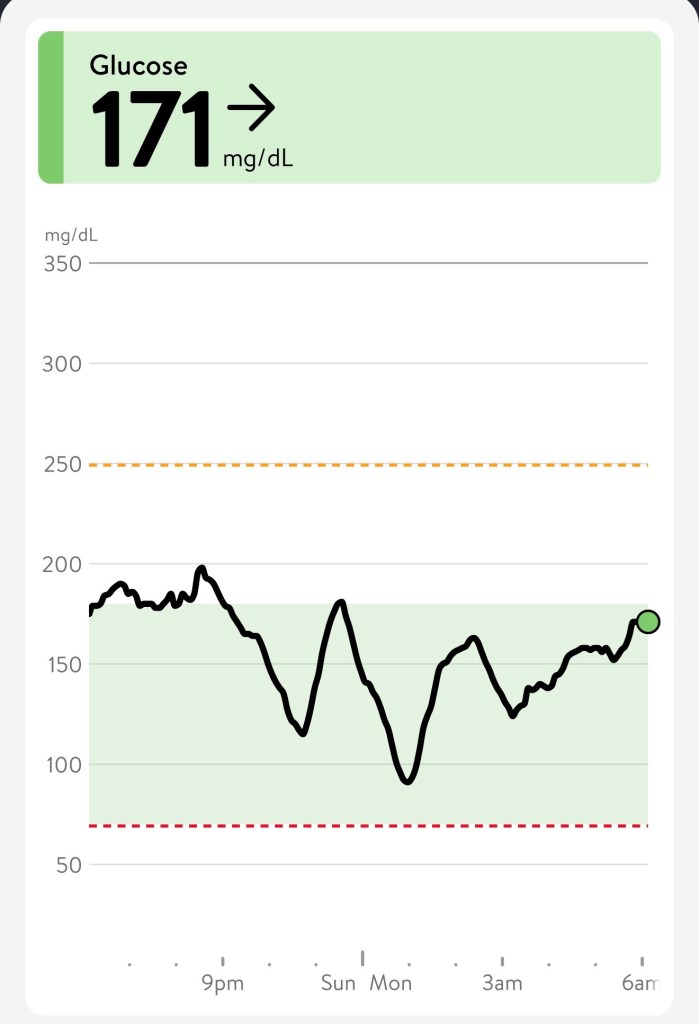
We thought her sensor had expired but it turned out that she turned her phone off because she did not want to hear notifications beeping while she was sleeping. I HAVE NO WORDS!!! When I turned it back on, this is what registered on her glucose monitor!
After my mom’s phone was turned back on
So many expletives were running through my mind. I had a lot of things to be annoyed and upset about but honestly, I was just NUMB.
The next paragraph probably makes me seem heartless but the harsh reality is that I am becoming desensitized. I knew what to expect and what was next. The paramedics loaded my mom up in the ambulance and I carried on with my day. I kept my CT scan appointment and handled that before Jon and I even went to the ER. I knew it would be a couple of hours before she got settled. We checked in with her and made sure she was ok but we didn’t wait at the hospital with her. I didn’t see a point just staring at her sleeping. After she was discharged from the ER, we took her to her labwork appointment. She had required prep work for her biopsy procedure scheduled for the following Wednesday, 5/20/26. Everything returned back to status quo quickly, everything EXCEPT my 4 year old.
He was (and still is) TRAUMATIZED! He is constantly on edge. Always concerned. There has not been a single day since 5/15 that we have not heard him utter some form of these words, multiple times a day.
“I’m scared for Ahma, she is sick.”
“I am worried about Ahma”
“Daddy, check Ahma’s blood sugar”
“Daddy, check granddad’s blood sugar”
“Mommy, come with me to check on Ahma”
“Ahma, you need to eat something”
“Ahma, you need to take your medicine”
“I’m scared”
No matter how much my mom tries to convince him that she’s not sick, he continues to worry. My son saved my mom’s life and has witnessed things that a child cannot easily process or understand. I know these experiences make him into a caring human but my heart is so very heavy with sadness for my little empathetic boy.
When you’re a kid, you can’t wait to grow up to be in charge. It’s a shame that the price you pay for all that independence is overwhelming responsibility and the byproducts of getting OLD.
Sure, you can stay out as late as you want but once you hit your mid 40s, your vision turns to crap, your metabolism tanks, and the only bottles popping, are bottles of ibuprofen and prescription pills.
Last month (5/8/26), I finally took care of having several legal documents for my mom and sister signed and notarized.
Durable Power of Attorney
Medical Power of Attorney
HIPAA Authorization
Advance Directive
Last Will in Testament
I am grateful for my friend who is a notary. She scheduled time to come to our house to check off this morbidly uncomfortable task that has been lurking on my to do list for months!
That same day, after all the documents were signed, I rushed my sister to a doctor appointment. We established my sister as a patient with a new doctor because the prior one was not taking my requests for genetic testing seriously. To simplify things, my sister and mom are now patients at the same practice. I can login to a patient portal and communicate with both their medical teams. This is WINNING in your 40s!
These last few months have been filled with a barrage of medical appointments for my mom, my sister, & myself. Dentist appointments, well-women exams, mammograms, blood work, a biopsy procedure, oncologist appointments, an urgent care visit, CT scans, PET scans, ultrasounds, and on and on. Unfortunately, in the month of June we have even more excitement to brave:
– a cardiologist appointment for me
– genetic counseling / testing for both my sister and I
– physical for my sister
– additional dentist appointments for my mom and sister
– and the icing on the cake, a 2-3 hour full hysterectomy and omentum surgery for my mom.
Why surgery?!? Well the biopsy (5/20/26) of the mass identified in my mom’s PET scan was not cancerous. Ironically it is probably inflammation or a collection of dead cells (scar tissue) caused by the chemotherapy. As planned, after my mom finished her chemo sessions, her oncologist referred her to a gynecologic oncologist. We had a video conference with this new doctor on 5/27/26, and she recommended surgery for my mom. Her cardiologist will have to give his approval but my mom’s surgery is scheduled for 6/22/26.
My mom is understandably freaked out and is considering not going through with the surgery. Honestly, I’m not sure if her cardiologist will even clear her for it. I called her cardiologist 3 times over the past 3 weeks and have been unable to get a green light from him. My mom has two oncologist appointments this week, Tuesday with her new doctor and Thursday with her original doctor. I encouraged her to share her concerns about surgery and next steps with them. We should know more after this week.
Toys “R” Us had the right idea, I don’t wanna grow up!
“And so I cry sometimes when I’m lying in bed / Just to get it all out, what’s in my head / And I, I am feeling a little peculiar” – 4 Non Blondes
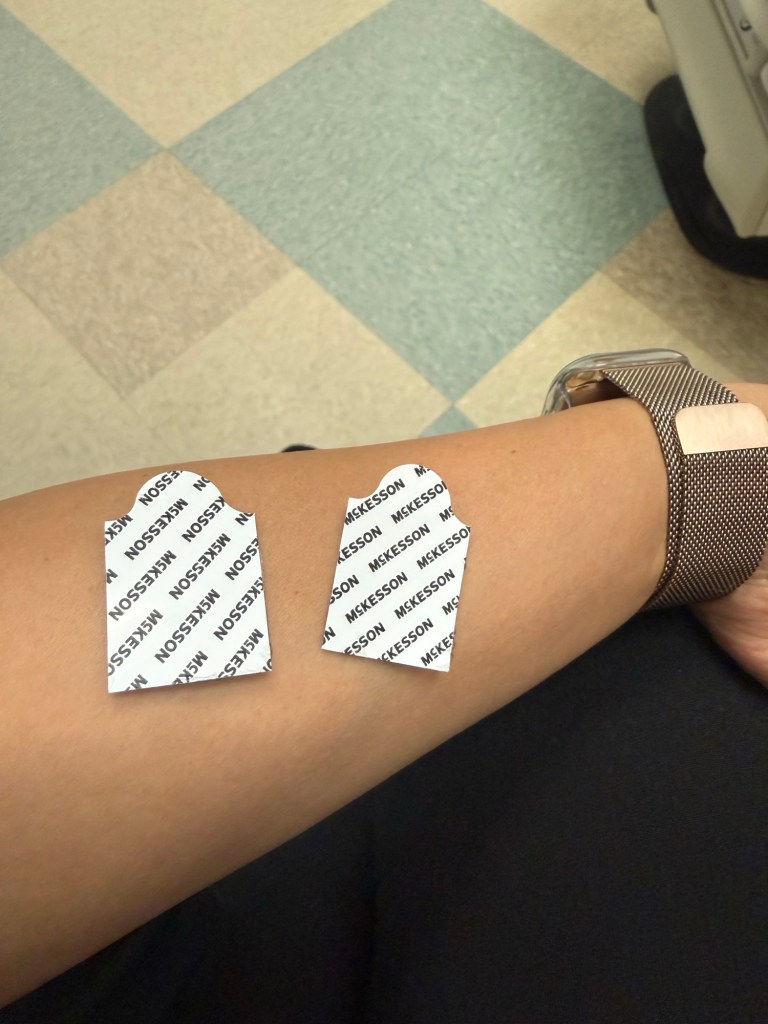
5/2/26 – About a week prior, I started to experience some shoulder and neck pain. I didn’t give it much thought, just attributed the discomfort to sleeping weird or pulling a muscle. After a week the pain had not subsided and started to move to the left side of my chest, I started to have a conversation with Gemini (my AI friend). No matter how I tried to convince Gemini that it was probably nothing, Gemini continued to recommend an ER or urgent care visit. I felt “off” enough to comply. 2.5 hours and an EKG later, the urgent care doctor said she believed it was probably musculoskeletal. She also said, “your EKG was mostly normal, but you should follow up with a cardiologist.”
When you’re in your 40s these are the type of stickers you get at the doctor office 🫣
So yeah, the fun continues.
5/4/26 – PET Scan, TAKE 2. 🙄 I specifically requested the scheduler for a Monday appointment because Jon and I would be home Sunday to remind & encourage my mom to adhere to the no carb diet restriction. I was worried whether we would get the results in time for her oncologist appointment the very next day, but the scheduler was helpful and said we could request a rush on the report.
I am highly skeptical that she actually ate 0 carbs / sugar and fasted from midnight based on her glucose levels but I took her to the PET scan appointment and saved the screenshot to share with her oncologist if the results seemed strange.
5/5/26 – Took my mom to my mammogram appointment so she wouldn’t be late for her oncologist appointment…because in the midst of managing all of her appointments…I am supposed to stay on top of my own healthcare needs.
We made it to her 3:45pm appointment with her oncologist. Good news, the PET scan did not show active cancer. Weird news, the PET scan showed a mass in the abdomen. It explains the pain my mom has been experiencing since January when she was discharged from her 2 week stay in the hospital. The mass did not show up in her CT scan or the ultrasound so her doctor was surprised to see it in her PET scan. Next step, biopsy of the mass to determine if it is cancerous.
I’m the bad guy, but not the cool version that Billie Eilish sings about, the one that annoys 73 year old women and make them avoid you like the plague.
I am sick of being the bad guy…
the one who has to question why my nom still has medicine in her Mon AM pill slot on Monday evening
the one who has to obsess about what she is eating 24 hours before a scheduled PET scan because of the required no carb, no sugar diet restriction.
the one who has to cancel the PET scan the evening before because her blood sugar dipped too low, forcing her to eat carbs / sugar for a quick fix
the one who has to ask her if she’s gotten out of bed and walked around when your sister says she’s in pain and can’t move in the bed
the one who has to repeatedly answer the same questions because she either has chemo brain fog or dementia or “doesn’t pay attention to what I say” (her words not mine)
Thoughts that have crossed my mind today…
Uninstalling the LibreLinkUp app and just live in blissful ignorance about my mom’s blood sugar.
Not monitoring her diet before her PET Scan scheduled for next Monday and letting the results be what they are, even if it ends up being erroneous.
My mom’s oncologist decided that one more round of chemo was in the cards. Boooo hisss ewwwww!!! So on 4/7/26 instead of starting maintenance like we originally hoped, my mom had her 7th round of chemotherapy.
I had a work conflict so I asked for help from family to drop my mom off at her chemo appointment. I packed her lunch and snacks for the day and asked her to make sure she took her insulin and syringes. She was annoyed with my micromanaging and after a series of eye rolling and requests for me to “just leave” I lost my temper and left for work angry!
Later that morning when I checked her location, Life360 showed her phone still at home and her Continuous Glucose Monitor had stopped tracking since 8:15 am. There were two possibilities, she left her phone at home or her cellular was disabled. I stated to panic but reminded myself that she had nurses around so if something happened they could handle or call me.
Honestly, it ended up being a blessing to be disconnected for the day.
My mom’s 6th chemotherapy was last Tuesday, March 17th. It was originally scheduled for Friday, March 13th but had to be postponed to accommodate a new port placement on Monday, March 16th.
I am nervous about the possibility of this new port becoming infected like the last one but with 13 months of maintenance, requiring Bevacizumab infusions every 3 weeks, a new port made sense.
My mom has had continued discomfort on the left side of her abdomen under the breast but after two chest x-rays and an abdominal ultrasound, her oncologist is not seeing anything concerning. She has had to take a couple of doses of pain medication which has its own adverse side effect of constipation.
My mom still suffers from poor appetite but she does make an attempt to eat and drink. Her efforts are evident with no additional hospitalizations after her last 3 treatments. So I consider that WINNING!
I was hopeful that maintenance would be a time of recovery for my mom, but I learned at her last oncologist appointment that she will also be prescribed oral pills in addition to the Bevacizumab infusions. In my initial research and conversations with the infusion nurses, I learned that pill medications during maintenance usually result in continued nausea and other unpleasant symptoms. This was so disheartening. I have been avoiding talking about this with my mom. I wanted her to enjoy the milestone of completing her 6 rounds of chemotherapy without the dark cloud of 13 months of continued maintenance.
She has bloodwork scheduled for Monday, an appointment with her oncologist on Thursday and a PET scan in the near future.
I continue to be anxious about her memory but only time will tell if it’s chemo brain or dementia.
She’s come a long way and I really hope things become easier for her.
Life has been busy and things eerily calm with my mom’s cancer…in this case, no news really meant good news. I appreciate those who randomly text me and ask about my mom. Thank you for keeping her in your thoughts.
I wonder if other families going through cancer have the same frustrations with food or if this is just a ME thing.
As long as I can remember, food has always been such an important part of my life. Food has always equaled love for me. When I was a kid, I remember my dad coming to pick me and my sister up to take us to McDonald’s on the weekends before we moved out of state (California to Texas). When we would visit him for Spring Break, Winter Break, & Summer vacation, we had multi-dish dinners every night and he would keep his house stocked with all our favorite quick prep microwave foods, snacks, & drinks to help ourselves to when he was at work. My mom worked full-time but still managed to cook dinner for us every night. She always found some way to efficiently create balanced meals with carbs, protein, & vegetables all in one pot. And I have fond memories of weekend trips to Chinatown (Richardson, TX) to enjoy lunch with my mom and sister. Every one of our family / friend get togethers centered around food and lots of it! To this day, if I were to call my mom or dad on the phone, one of the first questions I would be asked is, “have you eaten?” 🥰
The unhealthy side of my relationship with food involved being forced to clean my plate and never wasting food. It led to bad habits of over overeating that I honestly still struggle with as an adult. I am also very conscientious of wasting food and have a difficult time throwing leftovers away and cleaning not just my own plate but my family’s plates too. I was also cursed with digestive challenges. If I wasn’t throwing up from motion sickness or drinking carbonated beverages then I was struggling with constipation. I avoided sodas as a kid and I am still obsessed with getting enough fiber every day.
When I became a mom, my biggest struggle with my children was food related. While my best friend focused on sleep training her children, I was obsessed with their food intake. Her children slept independently within months, while my two youngest still have terrible sleep habits. I was always willing to sacrifice my own sleep, but I was never willing to compromise on making sure they ate balanced meals.
I guess knowing all this about myself, I shouldn’t be surprised that this is the one area that is the most contentious for my mom and I.
Her lack of an appetite, the amount of food, and nutritional quality she intakes has consumed so much of my daily interactions with my mom. I know that both of us are beyond frustrated with each other.
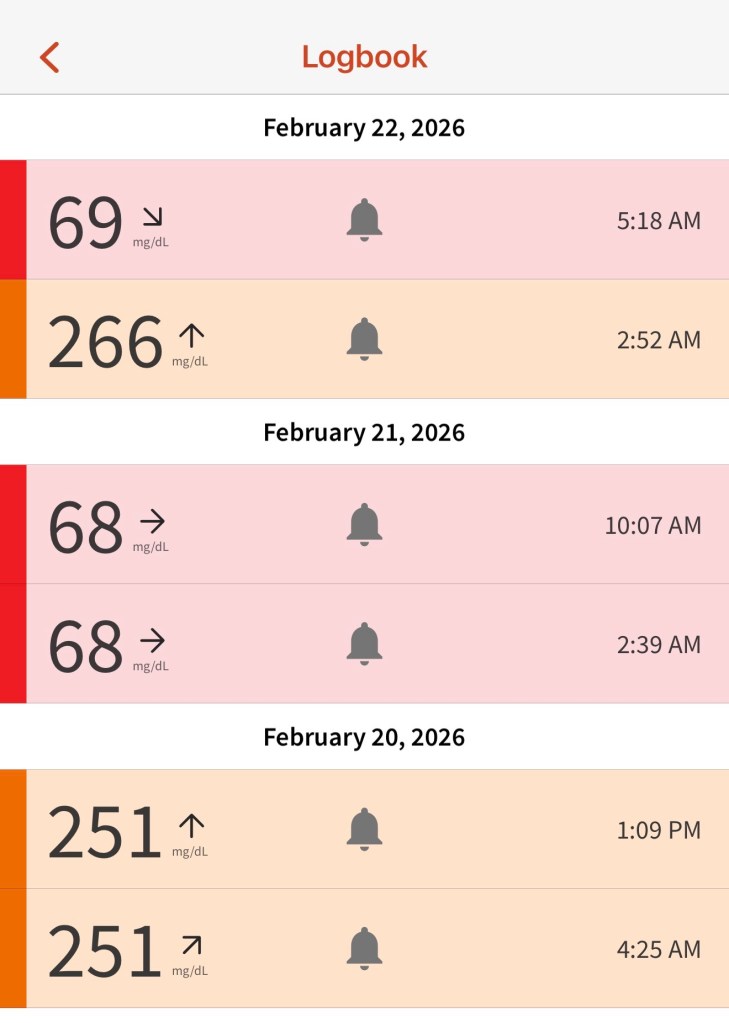
She had her fifth chemotherapy session this last Friday, 2/20/26 and these are the high/low glucose alerts from Friday thru Sunday morning.
We both feel out of control for very different reasons. She doesn’t understand why after being able to control and manage her diabetes for about 30 years independently it has become so challenging now. I feel out of control because she is 73 years old and “she knows her body” better than me and the doctors.
Here’s what I do know, most cancer patients do not actually die from the cancer. At least three people have told me that their loved ones died from pneumonia, and two people have told me their loved ones fell and suffered fatal head trauma.
My mom is scheduled to have her last chemo infusion mid-March and then she will be in “maintenance”. But it’s hard not to be doom and gloom, knowing the dangers of a weakened immune system and the fact that she also has three severely blocked heart valves.
What if…🥺
There are too many things to worry about for this pessimist. My best friend reminds me to consider how I want to remember my relationship with my mom. I know I don’t want our last interactions to be fraught with arguments. I need the strength to keep my mouth shut and letting things be if there is no immediate danger. She has insulin to combat the highs and glucose gummies to deal with the lows. It is what it is.

 WorkingTheTechWorld